

What if your critical meeting vanished when Zoom suddenly stopped working for more than an hour?
On April 16, 2025, users worldwide reported the outage, and third-party trackers showed a peak of about 67,000 reports around 3:01 p.m. ET.
This wasn’t just slow Wi-Fi; the geographic spread pointed to a platform-level failure that broke joins, audio, video, and logins for many people and teams.
This post gives real-time status, explains who’s affected and why it matters, and walks you through fast diagnostic checks and short-term fixes so you can decide what to do next.
Current Status and Scope of the Zoom Service Disruption

On April 16, 2025, Zoom went down hard starting midday Eastern Time. User complaints spiked at about 3:01 p.m. ET—more than 67,000 reports at peak. The company posted a restoration notice just before 5:00 p.m. ET saying “Service has now been restored after the earlier outage,” which meant over an hour of serious disruption. When things break, you’ll usually see the first big wave of user reports within 5 to 15 minutes of initial failures. Vendor confirmation typically shows up 15 to 90 minutes later once internal monitoring catches the widespread impact.
The April 16 disruption hit users globally. Reports came from the United States and multiple other countries. That geographic spread pointed to a core platform failure, not a regional or ISP thing. If you’re trying to figure out whether a current problem is local or widespread, check three sources: the official status page, the company’s social channels, and crowdsourced outage maps. When two of those three confirm the same issue, it’s a platform-level event.
Problems during major disruptions fall into clear patterns. Connectivity and meeting join failures? About 40 to 60% of user complaints during large incidents. Audio malfunctions make up roughly 20 to 30% of reports. Video quality degradation accounts for 15 to 30%. Authentication and login errors usually generate 5 to 15% of total volume. The exact distribution varies, but these ranges reflect typical crowd-reported proportions when core services go down.
Common symptoms during a Zoom service disruption:
- Audio dropouts or one-way audio where participants can’t hear each other even though connection indicators look normal
- Video freezing, low resolution forced downgrades, or complete camera failure despite correct device permissions
- Join failures where meeting links return error messages, infinite loading screens, or “unable to connect” notifications
- Login and authentication errors including HTTP 401 or 403 codes, SSO timeouts, or credential rejection despite correct passwords
- Screen share breaking, showing black screens to participants, or experiencing multiple-second latency that makes presentations unusable
- Chat and file sharing delays or complete failure to send messages and attachments within active meetings
Timeline of the Zoom Service Disruption and Key Milestones

Historical patterns show that detection begins when isolated user reports hit internal and third-party monitoring systems. Within 5 to 15 minutes of the first failures, aggregated complaint volumes spike visibly on outage tracking sites. Vendor engineering teams typically confirm incidents internally and begin posting acknowledgments within 15 to 90 minutes, depending on detection speed and internal workflows. Resolution timelines vary widely. Local edge issues often clear within 15 to 60 minutes, regional CDN or ISP incidents commonly take 1 to 3 hours, and major platform-wide back-end failures can extend 2 to 6 hours or longer when rollback or complex failover procedures are required.
The April 16, 2025 incident followed this pattern closely. User complaints began arriving midday Eastern Time, with the peak count of 67,280 reports recorded at 3:01 p.m. ET on a third-party outage tracker. Disruptions continued for more than an hour. Video calls, logins, website access, and app functionality all took a hit. The company issued a brief restoration notice shortly before 5:00 p.m. ET but provided no technical details about the root cause during the event. The median resolution time for major conferencing platform incidents is typically 1 to 2 hours. Companies usually post updates every 15 to 30 minutes once an incident is confirmed.
A typical outage unfolds in five stages. First, user reports arrive as scattered complaints on social media and support channels, often misattributed to local network issues. Second, spike detection occurs when third-party trackers and internal dashboards show report volumes exceeding baseline by 10x or more within minutes. Third, vendor acknowledgment appears on official status pages and social channels, confirming investigations and providing an estimated next update time. Fourth, mitigation actions begin. Engineers apply hotfixes, roll back recent deployments, or reroute traffic through backup infrastructure. Fifth, resolution confirmation is posted once monitoring confirms service levels return to normal. Post-mortem reports typically follow hours or days later.
Technical Indicators and Measurement Thresholds During a Zoom Service Disruption

Platform-wide incidents produce measurable performance degradation across multiple technical metrics. Engineering teams and network operations centers monitor real-time latency, packet loss, jitter, and bandwidth consumption to distinguish between localized network problems and infrastructure failures affecting millions of users. When thresholds cross predefined limits simultaneously across diverse geographic regions, the signal strongly indicates a central service failure rather than edge network variability.
Specific numeric thresholds help identify when user experience degrades from acceptable to poor. Round-trip latency under 100 milliseconds provides smooth real-time communication, but values climbing above 150 milliseconds introduce noticeable delays in conversation flow. Packet loss below 1% is normal. Values between 1 to 3% cause intermittent audio dropouts, and loss exceeding 5% renders calls nearly unusable. Jitter, the variance in packet arrival timing, should remain below 20 milliseconds. Jitter above 30 milliseconds produces robotic or garbled audio. Bandwidth per participant should exceed 1.5 Mbps for one-on-one HD video and 3 Mbps for group calls. When available bandwidth drops below 500 to 800 kbps, video quality collapses to static images or freezes entirely.
These thresholds help distinguish between “my network is slow” and “the platform is broken.” If you measure latency at 40 ms, packet loss at 0.2%, jitter at 15 ms, and 10 Mbps available bandwidth, yet still can’t join meetings, the fault lies with the service backend rather than local connectivity. Conversely, someone with 300 ms latency and 8% packet loss likely has a local ISP or Wi-Fi problem regardless of platform health.
| Metric | Degraded Threshold |
|---|---|
| Latency | >150 ms |
| Jitter | >30 ms |
| Packet Loss | >3–5% |
| Bandwidth | <500–800 kbps |
Diagnostic Checks to Confirm Whether the Zoom Service Disruption Is Global or Local

Figuring out whether a problem originates from your network or the platform’s infrastructure requires running objective tests before contacting support or switching providers. Many people waste time reinstalling software or blaming their ISP when the real fault sits in a distant data center. Just as many blame the platform when the issue is a failing home router or congested Wi-Fi channel. A structured diagnostic workflow removes guesswork and produces evidence that either confirms a local fix is possible or proves you need to wait for vendor resolution.
Start by testing basic internet connectivity and performance. Open a command prompt or terminal and run ping 8.8.8.8 to measure latency and packet loss to a Google public DNS server. Watch for round-trip times and packet loss percentages. Next, run a traceroute to identify where traffic slows or drops. Use traceroute on macOS or Linux, or tracert on Windows, targeting a known service IP if available. Flush your local DNS cache to eliminate stale entries. On Windows, run ipconfig /flushdns. On macOS, use sudo killall -HUP mDNSResponder. Override your DNS settings to a public resolver like 1.1.1.1 or 8.8.8.8 and retest. Run a speed test targeting at least 3 Mbps upload and download. Anything below 1 Mbps will cause video failures regardless of platform health. If you use a VPN, disable it temporarily. VPNs commonly add 50 to 200 ms of extra latency and can trigger packet loss on congested servers. Switching from Wi-Fi to wired Ethernet often reduces latency by 10 to 50 ms and eliminates interference-related packet loss.
Compare your results against the thresholds. If your latency is low, packet loss is negligible, DNS resolves correctly, bandwidth exceeds 3 Mbps, and the service still fails, the problem is platform-side. If your metrics show high latency, significant packet loss, or very low bandwidth, fix your local network first before assuming an outage.
The complete diagnostic sequence:
- Run
ping 8.8.8.8and verify latency stays below 100 ms with zero packet loss. - Execute a traceroute to detect upstream routing failures or slow hops beyond your ISP.
- Flush DNS cache using the appropriate command for your operating system.
- Change DNS servers to 1.1.1.1 or 8.8.8.8 in network settings and retry connections.
- Perform a speed test confirming upload and download both exceed 3 Mbps.
- Disable VPN and proxy services, then test again to isolate added latency and filtering.
Root-Cause Patterns Frequently Observed in Zoom Service Disruptions
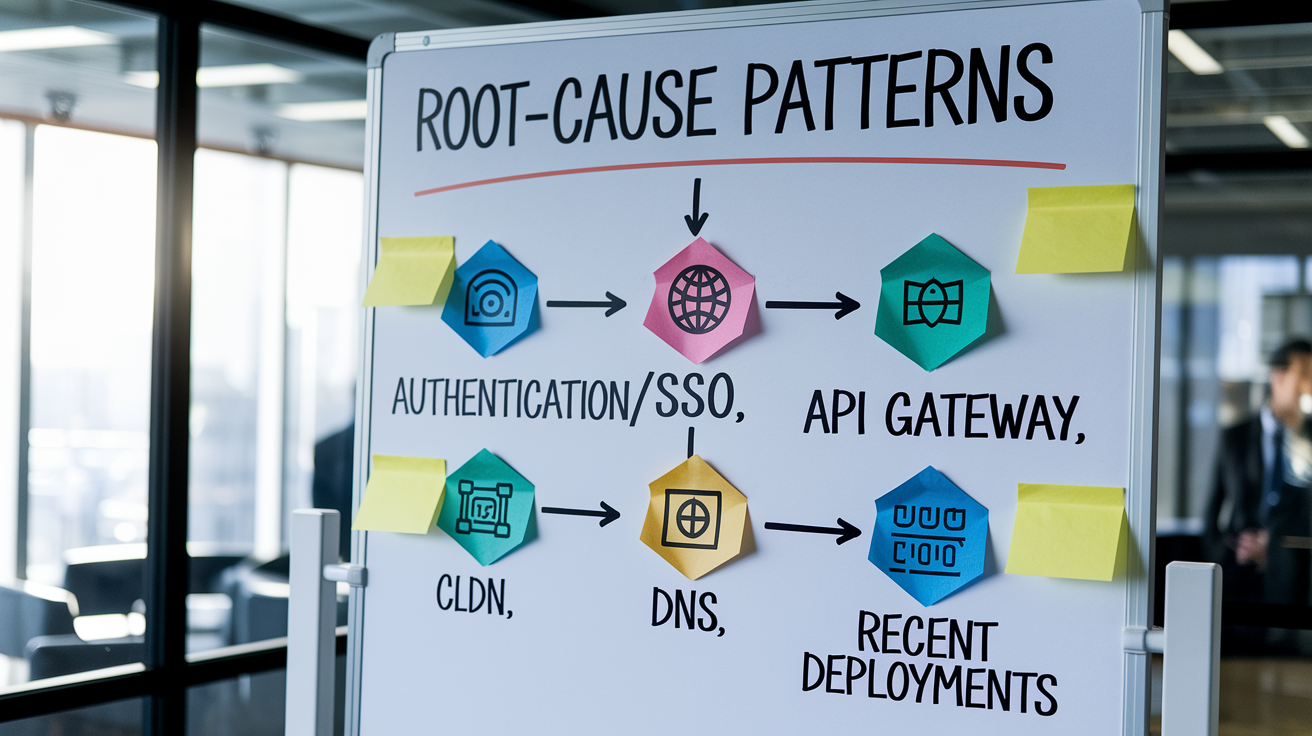
Major platform outages stem from a limited set of technical fault domains. Understanding which systems typically fail helps predict resolution timelines and appropriate workarounds. Authentication and identity services represent one common failure mode. When single sign-on providers time out or credential management backends return HTTP 401 or 403 errors, millions of users can’t log in or join meetings even though video and audio infrastructure remains healthy. API gateway overloads and edge-server saturation create similar widespread join failures, especially during usage spikes when load balancers can’t distribute requests fast enough.
Content delivery network failures and third-party dependency outages also trigger large-scale disruptions. If a CDN edge cluster serving a geographic region goes offline, users in that area lose access to static assets, signaling servers, or media relay nodes. DNS instability, whether from misconfigurations, BGP routing changes, or DDoS attacks against nameservers, prevents clients from resolving service hostnames. This makes the platform appear completely offline even when backend systems run normally. Recent deployment regressions rank among the most fixable causes. When a new code release introduces a critical bug, engineering teams roll back to the previous stable version, often restoring service within 30 to 90 minutes once the decision to revert is made. WebRTC signaling degradation, where the protocols negotiating peer-to-peer or server-relayed media streams fail, produces symptoms like one-way audio, video freezes, or the inability to establish connections despite successful authentication.
Platform-wide issues almost always trace back to centralized backend services or shared dependencies rather than distributed edge problems. A single authentication cluster failure affects everyone. A single edge node failure affects only users routed to that node.
The most likely technical fault domains:
- Authentication and SSO backend failures producing login errors and credential rejections
- API gateway saturation or edge-server overload preventing meeting joins
- CDN provider outages disrupting media delivery and static asset loading
- DNS resolution problems from configuration errors or upstream routing changes
- Recent software deployments introducing regressions that require rollback
Immediate Workarounds and Alternatives During a Zoom Service Disruption

When core platform functionality breaks, maintaining business continuity requires shifting to degraded-mode operations or alternative tools until service restoration. The fastest fallback for audio-only participation is switching to phone dial-in numbers, which bypass internet packet loss issues entirely and connect through traditional telephony networks with comparable latency but greater reliability during conferencing platform outages. If the desktop or mobile app refuses to launch or join meetings, try the browser-based web client. Different codebases and authentication paths mean one may succeed when the other fails.
Disabling high-bandwidth features often stabilizes marginal connections during partial outages. Turning off HD video and virtual backgrounds reduces bandwidth consumption by roughly 30 to 70%, allowing calls to continue on degraded links. Asking all participants except active speakers to disable their cameras further lowers per-user bandwidth requirements to under 500 kbps. This can mean the difference between a frozen call and a functional audio discussion. For urgent meetings during extended outages exceeding two hours, migrating to alternative platforms is justified. On April 16, 2025, institutional IT teams publicly recommended switching to Microsoft Teams as a temporary workaround when Zoom remained unavailable.
When real-time meetings become impossible, shift to asynchronous collaboration. Distribute meeting agendas, slide decks, and decision documents via email or shared file systems. Record video updates and post them for on-demand viewing. Use text-based collaboration tools for questions and approvals that don’t require live discussion.
Key fallback procedures:
- Use phone dial-in access codes to join as an audio-only participant, avoiding internet-based voice entirely
- Switch from desktop app to browser client or vice versa to bypass client-specific bugs
- Request alternate meeting links on backup platforms from meeting organizers
- Temporarily migrate critical calls to Microsoft Teams, Google Meet, or other conferencing services
- Enable audio-only mode for all participants to minimize bandwidth and stabilize degraded connections
- Move to asynchronous updates and shared documents when live interaction is impossible
Institutional and IT Guidance for Handling Widespread Zoom Service Disruptions

Enterprise IT teams face distinct responsibilities during platform outages: verifying scope, communicating with stakeholders, enabling alternatives, and collecting diagnostic evidence for vendor escalation. The first technical validation step is correlating identity provider and SSO logs for error-rate spikes around the incident start time. A sudden increase in 401 or 403 responses from authentication endpoints confirms backend failures rather than user errors. Next, verify CDN and regional gateway health by analyzing traceroute hop failures and checking for recent BGP routing announcements that might indicate upstream path changes or peering disputes.
If many affected users connect through corporate VPNs, ask a sample group to disable VPN and retest. VPNs frequently add 50 to 200 milliseconds of latency and can introduce packet loss when concentrator servers become overloaded. If disabling VPN restores functionality, the problem lies in VPN infrastructure or routing policies rather than the conferencing platform. Review recent configuration changes applied within the last 60 to 90 minutes. Firewall rule updates, access control list modifications, or proxy policy changes should be reviewed. Consider rolling them back if incident timing correlates with the change window.
Communication standards during outages require disciplined cadence and transparency. Provide timestamped status updates in UTC at first confirmation of the issue, then every 15 to 30 minutes while investigation and mitigation continue. Each update should specify affected scope (global, multi-region, or single country), impacted features (audio, video, join, login), and an estimated time for the next update. Give broad expected resolution windows such as “15 to 90 minutes” rather than precise times that create false expectations. Avoid speculation about root cause until engineering confirms findings.
Operational steps for enterprise incident response:
- Monitor real-time metrics (latency, jitter, packet loss, error rates) across multiple geographies to confirm scope
- Collect client logs, meeting IDs, timestamps, error screenshots, and traceroute outputs for vendor support tickets
- Notify internal stakeholders (executives, department heads, help desk teams) within 10 minutes of confirming widespread impact
- Enable and communicate fallback options (phone bridges, alternate platforms, asynchronous workflows) immediately
- Correlate the incident timeline with recent network, firewall, or authentication changes to rule out self-inflicted issues
- Maintain a running log of all actions taken, observations recorded, and communications sent for post-incident review
- Escalate to vendor support with detailed evidence packages including logs, diagnostic outputs, and affected user counts
- Post a final internal summary once service restores, documenting timeline, impact, workarounds used, and lessons for future incidents
Historical Patterns and Recurrence Trends in Zoom Service Disruptions

Tracking outage history helps organizations set realistic expectations for frequency, duration, and impact. Major platform-wide disruptions affecting millions of users are uncommon but high-impact events, while regional or client-specific problems occur more frequently with lower individual severity. When disruptions extend beyond two hours, they typically involve complex rollback procedures, multi-stage failover to backup data centers, or dependencies on third-party services outside the vendor’s direct control. Authentication provider failures and global CDN outages historically produce the longest resolution times because they require coordination across organizations and careful sequencing of recovery steps.
Organizations should maintain a rolling 12-month incident log capturing the number of major outages, average duration, median time-to-repair, most frequently affected regions, and recurring root causes. Patterns emerge over time. If CDN edge failures repeat quarterly, that signals a need for better redundancy or provider diversification. If authentication issues cluster around SSO provider maintenance windows, that indicates insufficient failover testing. Tracking these trends supports business continuity planning and vendor accountability discussions.
| Incident Pattern | Typical Duration |
|---|---|
| Regional CDN issue | 1–3 hours |
| Global auth failure | 2–6 hours |
| Recent-deploy regression | 30–90 minutes |
| ISP routing anomaly | 15–60 minutes |
Communication and Monitoring Practices During a Zoom Service Disruption

Getting solid incident awareness requires monitoring multiple information sources and cross-verifying signals to distinguish real outages from isolated problems. The recommended workflow checks three sources in order: the platform’s official status page, the company’s official social media channels, and crowdsourced outage reporting sites. When two of those three sources confirm the same issue, treat it as a platform-level event. Crowdsourced report spikes typically appear within 5 to 15 minutes of the first widespread failures, often faster than official vendor acknowledgments.
During active incidents, companies follow a standard communication pattern. Initial updates acknowledge the problem and state that investigation is underway. Subsequent posts describe mitigation steps being taken, affected features, and geographic scope. Final restoration notices confirm service levels have returned to normal. Each update should include a UTC timestamp and an estimated time for the next communication. Companies that go silent during prolonged outages create unnecessary panic and speculation. Over-communicating vague “we’re looking into it” messages without new information also frustrates users.
For internal stakeholders, draft incident communications before problems occur. Maintain templates that include placeholders for timestamp, affected services, known workarounds, expected next update, and where to find real-time status. Consistent formatting and update frequency build trust and reduce repetitive questions flooding help desks.
Best practices for monitoring and communicating:
- Update internal channels every 15 to 30 minutes during active incidents, even if no new information is available. Silence increases anxiety.
- Clearly describe the scope of impact (which features, which geographies, how many users) rather than vague “some users may experience issues” language
- Provide expected resolution windows as ranges (such as “15 to 90 minutes”) and revise them in subsequent updates if timelines change
- Use pre-written communication templates with fill-in-the-blank sections to speed initial notifications and maintain consistent tone
- Monitor platform-specific hashtags and keywords on social channels to detect emerging issues before official confirmation
Final Words
In the action, we covered how to confirm a current status, the incident timeline, metric thresholds, diagnostic checks, common root causes, practical workarounds, and IT escalation steps.
You now have a short checklist: check the status page, run ping/traceroute and speed tests, try dial-in or the web client, and follow your IT playbook for logs and rollbacks.
If you spot a zoom service disruption, prioritize diagnostics and fallbacks to keep meetings going. Stay calm—most incidents clear within a few hours.
FAQ
Q: Is Zoom currently experiencing a service disruption?
A: Zoom experienced a major platform disruption on April 16, 2025, peaking at 67,280 user reports around 3:01 p.m. ET; the vendor announced restoration just before 5:00 p.m. ET.
Q: How can I tell if the disruption is global or local?
A: You can tell if the disruption is global or local by checking the official status page, vendor social posts, and crowdsourced outage maps—matching reports across multiple countries indicate a global issue.
Q: What symptoms indicate a Zoom platform outage?
A: The common symptoms indicating a Zoom platform outage are audio dropouts, video freezing, meeting join failures, login/authentication (401/403) errors, screen-share failures, and chat or file-sharing delays.
Q: What was the timeline and peak of the April 16, 2025 outage?
A: The April 16 outage began with early reports, spiked to 67,280 reports at about 3:01 p.m. ET, lasted over an hour, and the vendor announced service restoration just before 5:00 p.m. ET.
Q: What technical thresholds indicate platform degradation?
A: The technical thresholds signaling platform degradation are packet loss above 3–5%, jitter over 30 ms, latency above 150 ms, and sustained bandwidth under about 500–800 kbps causing video and quality problems.
Q: How do I diagnose whether the issue is my network or Zoom’s platform?
A: You can diagnose this by pinging 8.8.8.8, running traceroute to service IPs, flushing DNS (ipconfig /flushdns or sudo killall -HUP mDNSResponder), switching DNS to 1.1.1.1 or 8.8.8.8, and running a speed test.
Q: What root causes usually trigger widespread Zoom failures?
A: The root causes that commonly trigger widespread Zoom failures include authentication/SSO timeouts, API or edge overloads, CDN or third-party provider outages, recent deploy regressions, DNS instability, routing/BGP changes, and WebRTC signaling issues.
Q: What immediate workarounds and alternatives should I use during a Zoom outage?
A: Immediate workarounds include using phone dial-in for audio, switching to the browser web client, disabling HD/video backgrounds to save bandwidth, migrating urgent calls to an alternate platform, and using audio-only or asynchronous collaboration.
Q: What should corporate IT do during a widespread Zoom disruption?
A: Corporate IT should correlate identity provider logs, verify CDN and edge gateway health, analyze BGP or upstream routing, test without VPN, consider rolling back recent changes, collect logs, and provide updates every 15–30 minutes.
Q: How should teams communicate and monitor during the disruption?
A: Teams should post timestamped UTC status updates noting affected features, next update ETA, and estimated windows; monitor official status, vendor social posts, and outage maps, and rely on two matching sources for confirmation.
Q: What historical patterns suggest about recurrence and expected durations?
A: Historical patterns show major Zoom disruptions are rare but impactful; regional CDN or auth failures are common, long outages over two hours often need complex rollbacks, and tracking incident counts and median repair time helps preparedness.

