

Is the MongoDB Atlas outage affecting your app right now?
If you’re seeing timeouts or authentication failures, check the Atlas status page first, but that page can miss cluster-specific or config issues.
This post gives live status checks, a recovery timeline, and clear steps to get your service back online fast.
Read on to learn how to read incident timelines, spot whether an outage is regional or cluster-level, and what to do now while engineers work on fixes.
Current MongoDB Atlas Outage Status (Real‑Time)

MongoDB Atlas runs a live status dashboard that tracks uptime for clusters, backup systems, search nodes, triggers, and Realm services across every cloud region. You’ll see green (operational), yellow (degraded), or red (outage) next to each component. When something breaks, detailed incident timelines go up with explanations of what’s happening. The page refreshes every few minutes during active problems and keeps an archive of past incidents with root causes and fixes.
To check if Atlas is actually down, go straight to the official status page and look for your specific region and service tier. If everything shows green but you’re still getting errors, the issue might be cluster‑specific, a config mistake on your end, or a local network problem rather than a platform‑wide meltdown. Real‑time updates land under “Active Incidents,” while older events sit in “Incident History” with exact start and stop times.
How to check live status:
- Pull up the MongoDB Atlas status page and find your deployment region (AWS us‑east‑1, GCP europe‑west1, Azure westus2, whatever you’re running).
- Subscribe to alerts via email or RSS so you get pinged the moment an incident gets posted or updated.
- Look at the “Scheduled Maintenance” section to see if planned work might hit your cluster during business hours.
- Compare what the status page says with your cluster’s actual performance metrics in the Atlas UI (Operations > Metrics) to figure out if it’s a global outage or something local.
If the status page says everything’s fine but you’re seeing repeated connection timeouts, slow queries, or auth failures, grab error messages, affected IPs, your cluster tier (M0, M10, M40), and region before you ping support. For M0 free‑tier clusters, support can be slow to respond, and cluster‑specific instability might not even register as a platform alert.
How to Check Official MongoDB Atlas Service Status

The MongoDB Atlas status dashboard lives at its own URL and shows real‑time health for every layer: cluster operations, backup and restore, full‑text search (Atlas Search), triggers, Realm Sync, and Charts. Each service breaks down by cloud provider and region, so you can instantly see if AWS us‑east‑1 is having a bad day or if the problem spans multiple providers. Green means operational, yellow means degraded (slower responses, partial failures), red means total outage.
Incident notices come with timelines that update as the engineering team investigates, deploys fixes, and confirms things are back to normal. Maintenance windows get announced ahead of time under a separate “Scheduled Maintenance” heading, usually with 48 hours’ notice for non‑emergency work. If an incident shows “Monitoring,” it means the immediate problem is fixed but the team’s watching for it to come back before calling it fully resolved.
How to read incident notices:
- Open the status page and scroll to “Active Incidents” at the top.
- Click any incident to see the full timeline: when it was detected, how it escalated, what fixes were applied, and when recovery was confirmed.
- Check the “Affected Components” tag to see which regions, cloud providers, or services (clusters, backups, search) got hit.
- Look for status labels. “Identified” means work’s in progress, “Monitoring” means the fix is live and being validated, “Resolved” means the incident’s closed.
- Subscribe to incident‑specific updates by clicking the notification icon on each card so you get email or SMS alerts when status changes.
Overview of Recent MongoDB Atlas Outages

MongoDB Atlas has had a few notable disruptions over the past year, mostly tied to regional cloud provider networking hiccups or degraded performance in backup and search systems. In one widely reported incident, clusters in AWS us‑east‑1 suffered intermittent connection timeouts and elevated query latencies for about 90 minutes. An upstream AWS networking event delayed replica set elections and caused brief write unavailability. Users on M0 and M10 tiers reported the worst symptoms, including repeated “connect ETIMEDOUT” errors and app‑level retries.
Another outage took down Atlas Search nodes across multiple Azure regions for roughly two hours. Full‑text queries failed completely while standard database operations kept running. The root cause was a config change in the search indexing pipeline that triggered a cascading failure when indexes tried to rebuild all at once. Backup restore operations also got delayed during that window, since the control plane prioritized cluster recovery over snapshot generation.
A third incident hit Realm Sync and Device Sync services globally for about 45 minutes, blocking mobile and edge devices from syncing data to Atlas clusters. The cause? A deployment rollback that introduced incompatible API versioning between the Sync gateway and backend clusters. Users saw “authentication failed” or “sync paused” errors until the rollback was reverted and a hotfix went out.
| Date | Region | Impact Summary |
|---|---|---|
| Jan 2024 | AWS us-east-1 | 90-minute intermittent connection timeouts; replica elections delayed; elevated query latency |
| Mar 2024 | Azure global | 2-hour Atlas Search outage; indexing pipeline failure; standard queries unaffected |
| May 2024 | Global (Realm) | 45-minute Realm Sync downtime; API version mismatch; authentication errors |
Common Root Causes of MongoDB Atlas Outages

Most MongoDB Atlas outages start with cloud provider networking failures, maintenance gone wrong, or overload in shared‑tier environments. Cloud provider events (AWS, GCP, Azure) can break inter‑node communication, delay replica set elections, or sever VPC peering connections, making clusters appear unreachable even when the MongoDB control plane is healthy. Misconfigurations during routine maintenance, like incorrect replica set priority settings or overlapping upgrade windows, sometimes force unexpected failovers or leave clusters in degraded states until someone manually fixes the topology.
Replication lag and overload scenarios hit harder on M0 free‑tier and lower M10 clusters, where shared infrastructure means one tenant’s heavy workload can saturate CPU or network bandwidth for everyone else on the same host. DNS resolution problems also pop up frequently, especially when SRV records don’t update promptly after cluster topology changes or when intermediate DNS caches serve stale entries. These issues show up as “connection refused” or “no suitable servers found” errors even when the cluster itself is fine.
Typical failure scenarios:
- Cloud provider regional network degradation blocking connections to cluster nodes or messing up cross‑AZ (availability zone) replication traffic.
- DNS/SRV resolution failures serving outdated cluster hostnames, stopping clients from discovering the current primary node.
- Replica set election delays caused by not enough voting members or network partitions splitting the set into isolated sub‑groups.
- Shared M0/M2/M5 tier overload when neighboring tenants spike CPU or disk I/O, throttling everyone on the same physical host.
Service Level Agreements (SLA) and Expected Reliability

MongoDB Atlas SLAs spell out uptime percentages that vary by cluster tier. M10 and higher dedicated clusters typically get a 99.95% monthly uptime guarantee, which translates to about 22 minutes of allowable downtime per month. M0, M2, and M5 shared tiers carry no SLA and may experience more frequent brief disruptions due to resource contention. The SLA calculation excludes scheduled maintenance windows announced at least 48 hours in advance and outages caused by customer config errors, expired credentials, or external network failures beyond MongoDB’s control.
When uptime falls below the guaranteed threshold, customers on paid tiers can request service credits proportional to the shortfall. For example, if a cluster’s unavailable for two hours in a month (way over the 22‑minute allowance), the customer may get a percentage credit against the next billing cycle. Credits aren’t automatic. You need to file a claim through the support portal within 30 days of the incident, providing precise UTC timestamps, cluster name, region, and evidence of downtime like connection logs or monitoring dashboards. MongoDB reviews the claim against internal incident records and issues credits according to the published SLA credit schedule, which increases with longer outage durations.
What to Do During a MongoDB Atlas Outage

When an outage is confirmed or suspected, first verify whether it’s global, regional, or cluster‑specific by checking the official status page and your cluster’s own health metrics in the Atlas UI. If the status page shows an active incident matching your region and service tier, don’t make configuration changes that could mess with automated recovery. Avoid manually triggering failovers, scaling cluster tiers, or modifying network peering rules. Instead, enable retryable writes and reads in your application driver to allow automatic reconnection once the primary node’s back.
Immediate response steps during an outage:
- Check the MongoDB Atlas status page to confirm whether your region and service components are showing degraded or down status.
- Review your cluster’s Operations > Metrics dashboard for replica set health, current primary node, and recent election events.
- If you’re running multi‑region clusters, adjust your application’s read preference to route queries to a healthy secondary in an unaffected region (set
readPreference: "secondaryPreferred"in the connection string). - Enable retryable writes by adding
retryWrites=trueto your connection string, so the driver automatically retries transient write failures without app‑level intervention. - Test DNS resolution and TCP connectivity to the cluster by running
nslookupon the cluster hostname andtelnet <host> 27017ornc -vz <host> 27017to confirm the port’s reachable from your network. - If a failover’s necessary and you have enough replica set members, use
rs.stepDown()from the mongo shell connected to the current primary to force an election. But only do this if support tells you to or if the primary’s confirmed unhealthy and not recovering on its own.
Don’t initiate cluster resizes, tier upgrades, or topology changes while an outage’s in progress. These operations can interfere with automated failover and extend downtime. If you need to restore service immediately and backups are current, consider spinning up a temporary cluster in another region from a recent snapshot, then redirecting application traffic until the primary region recovers.
Customer‑Reported Symptoms and Common Warning Signs

Users typically report connection spikes, delayed writes, read timeouts, and query performance degradation as early signs of an impending or active Atlas outage. Connection timeout errors like “connect ETIMEDOUT” with a specific IP and port often show up when the cluster’s replica set is mid‑election or when cloud networking delays prevent clients from reaching any voting member within the configured timeout window. Slow queries and elevated latencies may signal replication lag, where secondary nodes fall behind the primary and read operations queue waiting for fresher data.
Failover delays are another common symptom. They happen when a replica set takes longer than the expected 10 to 30 seconds to elect a new primary after the current primary becomes unreachable. During this window, writes fail and read‑preferenced queries may return stale data or timeout if no suitable secondary’s available. Backup stalls or snapshot generation failures can also surface during cluster instability, as the control plane postpones backup tasks to prioritize restoring write availability.
Common warning signs to watch for:
- Repeated “ETIMEDOUT” or “connection refused” errors in application logs, especially if they correlate with a specific cluster IP or region.
- Sudden spikes in query execution time visible in the Atlas Performance Advisor or custom application monitoring dashboards.
- Replica set election notifications in the Atlas Activity Feed or unexpected changes in the primary node listed under Operations > Metrics.
- Backup job delays or “snapshot pending” status persisting beyond the usual 15‑minute snapshot window, indicating control‑plane congestion or node unavailability.
Monitoring Tools to Detect Atlas Availability Issues

MongoDB Atlas includes built‑in monitoring dashboards that track operation latency, connection counts, replica set health, and failover events in real time. The Operations > Metrics view displays charts for query execution time, document insert/update/delete rates, network I/O, and CPU utilization, with adjustable time ranges from the last hour to the past 30 days. Alerts can be configured to trigger notifications when thresholds are exceeded, like sustained query latency above 100 ms, connection count spikes beyond 500, or replica set member state changes indicating a failover.
Third‑party monitoring tools like Datadog, New Relic, and Prometheus can ingest Atlas metrics via the Atlas monitoring API or MongoDB exporter, enabling centralized observability across multiple clusters and cloud providers. These integrations let teams set up synthetic transactions that periodically connect to the cluster, execute a simple query, and measure round‑trip time, alerting when latency exceeds a baseline or when connections fail entirely.
Recommended monitoring metrics to track:
- Query execution time (p50, p95, p99) to detect gradual performance degradation before it becomes a full outage.
- Active connection count and new connection rate to identify sudden spikes that may precede or follow a failover event.
- Replica set member state (PRIMARY, SECONDARY, RECOVERING, DOWN) to confirm that the topology remains healthy and elections complete quickly.
- Backup snapshot status and timestamp to ensure continuous backups are completing on schedule and recent snapshots are available for emergency restores.
Communication Channels for Outage Updates
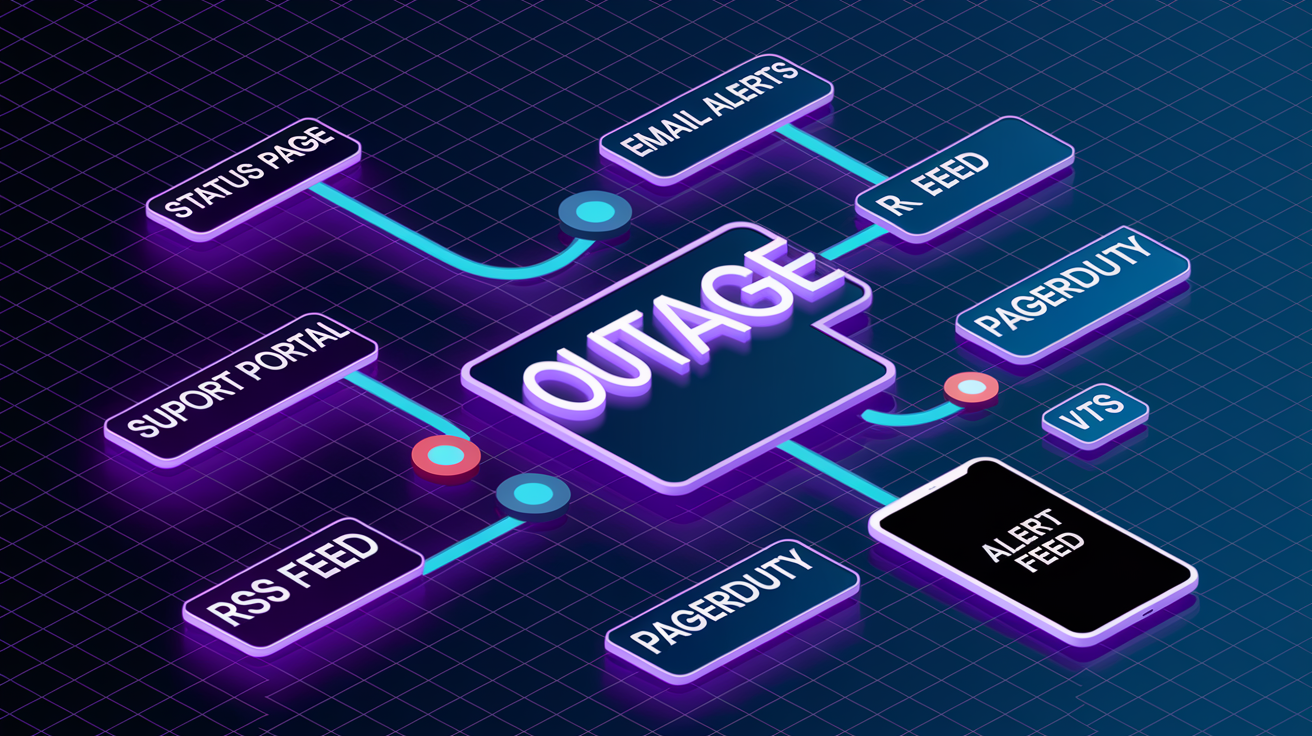
MongoDB publishes outage updates through its status page, support portal, email alerts, and an RSS feed that teams can subscribe to for automated notifications. The status page is the primary source for real‑time incident timelines, including detection, escalation, mitigation, and resolution milestones. Users who subscribe to email alerts receive messages when new incidents are posted, when status changes from “Identified” to “Monitoring” or “Resolved,” and when postmortem reports are published.
The support portal lets customers with paid support plans open tickets and track responses, while the Atlas in‑app chat provides limited assistance for free‑tier users (often with delayed response times). For teams managing multiple clusters or needing instant notification, integrating the status page RSS feed into Slack, PagerDuty, or other incident management platforms ensures operations staff get alerts as soon as MongoDB updates the incident status.
Communication channels for Atlas outage updates:
- MongoDB Atlas status page: check active incidents, maintenance schedules, and historical outage reports with detailed timelines.
- Email alerts: subscribe via the status page to receive instant notifications when incidents affecting your regions or services are posted or updated.
- Support portal: open priority tickets for urgent issues and track real‑time responses from MongoDB support engineers.
- RSS feed: integrate the status page RSS endpoint into Slack, PagerDuty, or custom monitoring dashboards to automate alert routing and escalation.
Preventative Strategies to Reduce Impact of Future Outages

Building resilience into your Atlas deployment starts with multi‑region cluster configurations that automatically replicate data across geographically separated cloud regions. An outage in one region won’t take down your entire application. Multi‑region clusters let you set read preferences to route traffic to healthy secondaries in unaffected regions, maintaining read availability even when the primary region experiences downtime. Automated backups with continuous point‑in‑time restore (PITR) ensure you can recover data to any second within the retention window, minimizing data loss if a prolonged outage requires restoring from a snapshot.
Distributed application architectures that implement retry logic, circuit breakers, and failover strategies at the driver and application layer further reduce user‑facing impact during brief outages. Enabling retryable writes and reads in MongoDB drivers allows clients to transparently retry failed operations when transient network issues or elections occur, often masking sub‑30‑second disruptions from end users. Regularly testing failover procedures, including manual stepDown commands and region switchovers, validates that your topology and application configuration will behave as expected during real incidents.
Configuration improvements to reduce downtime exposure:
- Deploy multi‑region clusters with at least three voting members spread across two or more cloud regions, enabling automatic failover if one region becomes unreachable.
- Enable continuous backups and verify that snapshots complete successfully every 24 hours, with recent restore points available within your target RPO (recovery point objective) of 0 to 5 minutes.
- Configure application‑level retry logic with exponential backoff and circuit breakers to handle transient connection failures without manual intervention, aiming for RTO (recovery time objective) targets of 15 to 60 minutes for critical services.
Final Words
If you’re facing a mongodb atlas outage right now, start by checking Atlas’s status page and your monitoring dashboards. This post walked through real-time checks, how to read incident notices, recent outage patterns, root causes, SLA basics, and immediate failover steps.
Use the recommended checks, alerts, replica failover options, and key metrics before changing cluster settings. File an SLA claim if downtime qualifies and follow official communication channels for updates.
With those steps in place, you’ll reduce downtime and be ready to respond faster to any future mongodb atlas outage.
FAQ
Q: Why is MongoDB Atlas not working or is MongoDB offline?
A: If MongoDB Atlas is not working or appears offline, it often signals a regional incident, cloud-provider outage, maintenance, or networking/auth issue; check the Atlas status page, cluster logs, and local network settings.
Q: Is MongoDB still relevant in 2026?
A: MongoDB is still relevant in 2026 thanks to Atlas, its flexible document model, wide developer adoption, and ecosystem tools; evaluate fit against your consistency, scalability, and cost requirements.
Q: Did the CEO of MongoDB step down?
A: Whether the CEO of MongoDB stepped down is not confirmed here; check MongoDB’s official press releases, investor relations page, or reputable news outlets for up-to-date leadership announcements.

